File management: Defined, benefits, & features
What is file management?
File management is the process of organizing, storing, and retrieving digital files. It includes systems to help people find files, name files clearly, back up files, and control who can access files. Organizations need effective file management strategies to operate efficiently and protect their data.
What is a file management system?
A file management system is software for managing electronic documents and digital assets. These file management tools go beyond ordinary file storage — providing features that help create, organize, and distribute files. Companies use file management systems to connect content into workflows and protect their content.
The software can include a searchable database, automated workflows, and version controls. It allows users to collaborate on documents in real time and distribute them efficiently across the organization. An efficient file management system is critical to maintaining data integrity and increasing productivity.
Purchasing a file management system is a wise investment for any organization looking to streamline its asset organization.
What are the best practices for file management?
Best practices for file management include standardizing file names and organizing the folder structure for your organization.
- Organize your files: Ensure your important documents, content, and other digital assets are organized into folders and subfolders so team members can easily find them.
- Standardize file naming: Decide on a naming convention that uses clear, descriptive document names — and make sure you stick to it.
- Back up your documents: If you’re not using cloud storage (and even if you are), make sure your important files are backed up regularly.
- Optimize with a software solution: Stop wasting time on repetitive tasks or worrying about accidental document deletion. Get a file management system that works for you and backs up files.
What are the benefits of having file management software?
File management software benefits include improved efficiency, collaboration, data security, file searchability, version control, content ROI, and scalability.
File management software is critical to any organization that needs to access, share, and secure its essential documents from the cloud, ensuring those assets remain available from anywhere. With organizations having offices around the world or employees working from home and spread across several time zones, keeping paper documents in a file cabinet or digital files on a desktop doesn’t make sense anymore. Now, cloud-based document management software is essential to safeguarding critical data.
File management software is an important tool that enables an organization to save precious time by finding documents quickly and to generate faster responses to inquiries from internal and external teams. Additionally, this software maintains historical folders, ensuring your team has access to assets as far back as the documents go.
Without these systems, many organizations can suffer from data loss due to accidental file deletion or hard drive failures. Having a file management system in place means that the organization can keep its data safe and secure, making it a vital tool for all organizations.
Improved efficiency
File management software significantly reduces the time employees spend searching for documents by organizing files systematically. This improved efficiency allows teams to focus on their core tasks without the frustration of locating important information, boosting overall productivity.
Enhanced collaboration
By centralizing files and enabling real-time access, file management systems facilitate improved collaboration among team members. Employees can share, edit, and review documents simultaneously, ensuring everyone is working with the most current version and reducing miscommunication.
Increased data security
Modern file management solutions provide robust security features, including access permissions, encryption, and audit trails. These controls protect sensitive data from unauthorized access and help organizations maintain compliance with data protection regulations.
Centralized storage
A centralized library ensures that documents are accessible from anywhere with an internet connection. This centralization supports remote work and reduces the risk of data fragmentation across multiple devices or locations.
Version control and document history
File management software tracks multiple versions of documents, allowing users to revert to previous versions if needed. Version control prevents the loss of important changes and supports accountability by maintaining a clear document history.
Reduced risk of data loss
Automated backup features within file management systems safeguard against accidental deletion, hardware failures, or ransomware attacks. Regular backups ensure that critical documents can be quickly restored, minimizing downtime and data loss.
Better organization and file retrieval
A well-structured folder hierarchy and standardized file naming conventions make it easier to organize and retrieve files. This organization reduces duplicate files and clutter, helping teams maintain a clean and efficient digital workspace.
Scalability
File management systems can grow with an organization, accommodating increasing volumes of data without sacrificing performance. This scalability ensures that businesses can continue to organize and access their files effectively as they expand.
Cost savings
By reducing reliance on physical storage and minimizing time spent searching for files, file management software can lead to significant cost savings. Organizations save on paper, storage space, and labor costs associated with manual file handling. Additionally, organizations save on creative spend because a centralized, searchable library extends asset shelf life.
Improved compliance and audit readiness
File management solutions help organizations maintain regulatory compliance by providing secure storage, controlled access, and detailed audit trails. This readiness streamlines audits and reduces the risk of penalties for data mishandling.
Who needs file management software?
| Teams using file management software | How teams use it |
|---|---|
| Creative teams | Organize and store marketing assets, manage design file versions, and collaborate efficiently on content |
| Marketing teams | Centralize and find marketing assets, track campaign files, and improve brand consistency across materials |
| Sales teams | Access up-to-date sales documents, proposals, and presentations quickly for client interactions |
Almost every organization faces the challenge of efficiently managing the different types of digital assets created by its internal and external teams. Having reliable and feature-rich file management software is valuable to every organization and team, regardless of industry. It streamlines content management and empowers users with tools for managing project files, version control, and collaboration. Most file management platforms offer robust search capabilities that enable users to effortlessly locate, edit, and share content, resulting in significant time savings and increased productivity.
What is the difference between file storage and file management?
File storage refers to the physical or digital location where files are stored, while file management refers to the processes and tools used to organize, track, and control access to those files; modern cloud file storage solutions often underpin these systems at scale.
Does your organization need a file manager?
Nearly every organization manages digital assets. Without an efficient asset manager in place, locating and accessing crucial information can become difficult as your content library grows. Organizations that cannot quickly find files lose productivity to lengthy file and folder searches.
A document management system provides an organized way to file and retrieve documents, saving time and resources. Modern file management software, like a digital asset management solution, enables AI-powered search for relevant information and the sharing of assets with colleagues, leading to a more streamlined workflow and improved collaboration. Whether your organization is small or large, a reliable document management system should be a top priority to enhance productivity and optimize content operations.
Common challenges without a file management system
You know you need a file management system when your team is experiencing:
- Difficulty locating important files quickly, leading to wasted time and reduced productivity
- Increased risk of data loss due to accidental deletion or hardware failure
- Confusion and unnecessary storage use due to duplicate files
- A lack of standardized file naming and folder organization, resulting in inconsistent file storage
- Limited or no version control, leading to errors from working on outdated documents
- Poor collaboration due to inaccessible or scattered files across multiple devices or locations
- Security vulnerabilities with uncontrolled access to sensitive data
- Inefficient backup and recovery processes, increasing downtime during data loss events
- Challenges in managing large volumes of digital assets without a clear structure
- Difficulty onboarding new team members due to inconsistent file organization and a lack of documentation
- Inability to provide remote access to files, hindering flexible work arrangements and remote teams
- Increased administrative burden of managing files manually without automation or workflows
- Compliance risks from improper handling and storage of sensitive or regulated documents
Things to look for when choosing an efficient file management system
Choose a file management system that is user-friendly, integrates with project management tools, and supports robust collaboration. Ensure it offers organized content management, effective search, version control, access permissions, and reliable backup. Prioritize security, compliance, and customization to meet your organization’s needs and boost productivity.
Here’s a full features list that you should consider prioritizing when selecting the best file management system for your organization:
- Ease of use: Look for a platform that is intuitive and user-friendly. It should be straightforward for your team to navigate and perform common tasks, such as uploading, accessing, and organizing files. A user-friendly system can save time and reduce the learning curve for your team, leading to higher adoption rates and increased efficiency.
- Project management integrations: The right integrations are essential if your organization relies on project-based work. These integrations let you connect your file management system to project management tools. Integration with project management software such as Adobe Workfront, monday.com, and Wrike can further streamline workflows.
- Solid collaboration features: Robust collaboration tools enable multiple team members to work on documents and files in real time. Effective collaboration features promote collaborative marketing, reduce errors, and enhance overall productivity within your organization.
With these factors in mind, you can confidently choose a system that meets your needs, keeps files organized, and increases productivity.
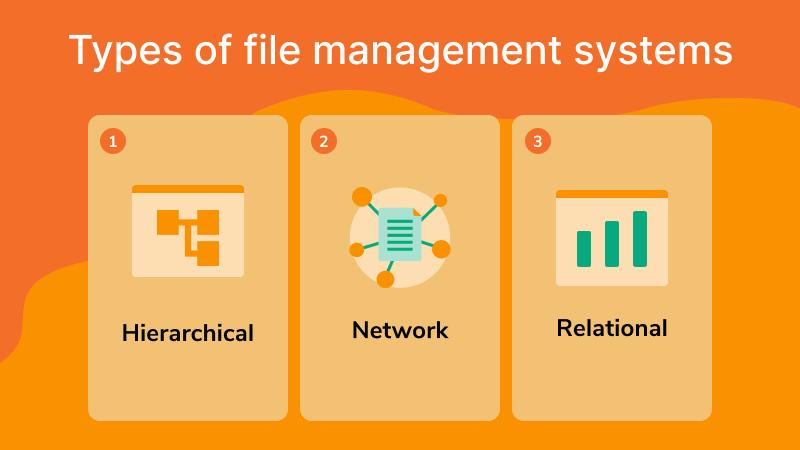
What are the three types of file management systems?
There are three main types of file management: hierarchical, network, and relational.
- Hierarchical file management organizes files in a tree-like structure, with folders and subfolders.
- Relational file management allows you to organize files based on their relationship to other files.
- Network file management operates across multiple computers on a network, enabling you to share and access files from various devices via secure, centralized file sharing.
Each type has its own advantages and disadvantages, so it’s important to choose the right system for your specific needs.
Hierarchical file managers
Hierarchical file management is the simplest and most widely used file management system. Content and folders are organized in a tree-like structure with a single root folder. It doesn’t require any additional software. This type of manager is the go-to for many organizations because it has key features that make it easy to use, including:
- Intuitive organizational system
- Easy to navigate and find assets
Why should you consider a hierarchical system?
- Simplicity and familiarity: The system mirrors physical filing systems, making it easy to understand and navigate. If you’ve ever organized documents into folders and subfolders, you already know how to use them.
- Efficient file retrieval: Hierarchical structure enables quick, efficient access. You know exactly where to find a specific asset or document, just as photo management software for organizations helps teams quickly locate visual assets.
- Scalability: As your asset volume grows, the hierarchical system can be easily expanded by adding more subfolders, though many teams eventually consolidate content into a structured digital asset library to maintain consistency.
- Improved collaboration: It facilitates team collaboration by organizing assets logically, making it easy for team members to locate and share data.
Network file managers
Network file management is a system that facilitates asset sharing and collaboration over a network. It does require a server or cloud-based storage solution. It is a great choice for organizations with multiple users who need to access and modify shared resources, especially because it has these key features:
- Centralized asset storage
- Simplifies collaboration and access control
Why should you consider a network system?
The advantages of a network system are manifold and could bring immense value to your organization. Consider adopting it if you’re looking for:
- Streamlined collaboration: With centralized asset storage, multiple users can access, modify, and share assets effortlessly, fostering collaboration and minimizing duplication.
- Convenience: It provides a platform for sharing assets across different devices and locations, enabling team members to work remotely while maintaining efficiency.
- Security: The system includes robust access controls that let you manage who can view and edit assets, thereby enhancing data security.
- Backup and recovery: Network systems often include backup and recovery capabilities, mitigating data loss risks and ensuring business continuity.
Relational file managers
Relational file management is a system that utilizes databases to relate assets based on specific attributes, such as keywords or project names. Unlike the other two, this type of manager requires specialized software or a custom database solution. It is ideal for organizing large volumes of assets that need to be searched or filtered regularly, especially if you’re looking for these key features:
- Highly scalable and customizable
- Enables complex searches and document retrieval
Why should you consider a relational system?
- Increased efficiency: With a well-designed database structure, users can quickly search and retrieve specific assets without manually sorting through large volumes of information.
- Enhanced collaboration: By relating assets through common attributes, team members can easily locate and access the same assets, streamlining collaboration processes.
- Cost-effective: While setting up a relational file management system may require an initial investment in software or development, it can save time and resources in the long run by increasing productivity and reducing errors.

How to evaluate an effective file management system that meets your organization’s needs
Before you start considering different file management systems, take the time to evaluate your organization’s specific needs:
- Define your organization’s applications (e.g., Google Drive, cloud storage systems, Microsoft Office, Microsoft SharePoint, Adobe Creative Suite) and asset types (images, videos, mobile apps, etc.).
- Identify the storage capacity required to migrate all your files to the new file management system.
- Determine the level of asset collaboration your team members need within the organization.
- Specify how many repetitive tasks and manual processes your team handles daily to ensure you get the exact features you need in the new platform.
- Narrow the list of potential file management systems to those that meet the needs of your organization’s unique requirements.
What features should you consider?
The best file management software for most teams includes intuitive content organization, powerful search, version control, access permissions, real-time collaboration, and reliable backup.
Here’s the full shopping list when looking at the file management systems:
- Content organization: If you need better ways to search, manage, and share digital assets, you should investigate software that gives you a structured way of organizing digital assets. These organization options may include folders, tags, and labels right out of the box, streamlining metadata management.
- Search functionality: Consider a robust search feature that lets users quickly find assets using natural language queries or by keywords, asset types, and metadata.
- Version control: Having an asset manager with built-in version control empowers your users to track changes and revert to previous versions.
- Access permissions: Ensure your in-house administrators can set up access controls and permissions for different user roles on the platform.
- Asset collaboration: Look for real-time document editing and approval workflow features that streamline proofing between stakeholders and creatives.
- Reporting: Check out usage reporting features to find out which files are most used and which are underutilized — so you can be better informed about how content performs.
- Backup: The system should provide regular backups.
Security and compliance
Security is a paramount concern when managing sensitive assets. For this step, you should involve your IT department to make sure all your bases are covered.
- Encryption: Ensure the data you’re storing is encrypted. This can get complicated, so once you start talking about this with prospective software providers, bring in someone from your IT team.
- User authentication: Ensure the file manager you’re evaluating supports the user authentication methods your company requires, such as single sign-on, multi-factor authentication, or identity management integrations.
- Compliance: This is a big one. Depending on your industry and the clients you serve, you may need to work through several compliance hoops. Bring in your IT and security teams to ensure the software you’re evaluating complies with regulations relevant to your organization (e.g., GDPR, HIPAA).
Integration and customization
While you might want to hit the ground running with an out-of-the-box solution, make sure you choose file management software that integrates with your existing marketing stack. Some things you should include on your checklist are:
- Third-party integrations: Look for a robust API that enables easy integration with other tools and services your team currently uses or will use in the future.
- Customization options: Users should be able to customize the new system to fit their specific needs and workflows.
Make file management easy with digital asset management
Digital asset management (DAM) is specialized software designed to store, organize, find, share, and automatically back up digital files such as images, videos, documents, and design assets.
Unlike traditional cloud storage solutions, which primarily offer basic file storage and sharing, DAM platforms provide advanced capabilities that enhance file management and team collaboration. For example, DAM systems like Canto include AI-powered search, AI-assisted metadata, robust version control, Digital Rights Management, and branded portals — features that go well beyond cloud storage. These tools enable more efficient organization, faster retrieval, and better governance of digital assets, making DAM a superior choice for managing rich media and creative content.
The top benefits of digital asset management include centralized asset management, enhanced asset discovery, improved brand consistency, better team collaboration, and more efficient operations.
- Centralized storage and organization: DAM centralizes all digital assets on a single secure platform, making it easy to organize files into relevant folders and apply metadata for quick search and retrieval.
- Enhanced search and discovery: With AI-assisted metadata tagging and powerful search functionality, users can find exactly what they need without browsing through endless folders.
- Version control and audit trails: DAM tracks versions and document history, allowing teams to work confidently with the latest files while preserving previous versions for accountability.
- Improved collaboration: Real-time sharing, branded portals, and digital workspaces enable team members and external partners to collaborate, streamlining workflows.
- Robust security and access control: Granular permissions and encryption protect sensitive data, ensuring that only authorized users can access or edit files.
- Automated workflows and backup: DAM automates repetitive tasks such as file sorting and backup, reducing manual effort and minimizing the risk of data loss.
By embracing digital asset management, organizations can significantly improve efficiency, protect their valuable digital content, and empower teams to work smarter and faster.
File management frequently asked questions
What is the difference between file management and digital asset management?
File management broadly refers to how digital files — documents, spreadsheets, executables — are created, stored, organized, and retrieved. Digital asset management (DAM) is a specialized form of file management focused on rich media and creative content, including images, videos, design files, brand assets, and related assets. DAM platforms add capabilities such as AI-powered search, rights management, version control, and branded portals that general file management tools don’t offer.
What is a file management system?
A file management system is software that helps users create, store, organize, retrieve, and distribute digital files. It can range from a basic operating system file explorer to an enterprise-grade DAM platform with AI search, automated workflows, and multi-team access controls.
What are the three types of file management systems?
The three main types are hierarchical (tree-structure folders), network (shared access across multiple computers), and relational (files linked and retrieved by metadata and attributes). Most modern cloud storage and DAM platforms use a relational approach, enabling search and retrieval that are far more flexible than traditional folder navigation.
What is the best way to organize digital files?
Start with a consistent file-naming convention, establish a clear folder hierarchy, apply metadata tags from day one, and centralize assets in a single platform. For teams managing large volumes, a DAM system with AI-assisted tagging is the most scalable approach.
How do I manage large volumes of files efficiently?
The key is centralization, metadata, and workflow automation. Centralize files on a single platform rather than spreading them across shared drives, email, and local storage. Apply consistent metadata so files are searchable without manual browsing. Use automated tagging and AI search to enable fast retrieval at any scale.
What is metadata, and why does it matter for file management?
Metadata is descriptive information attached to a file — things like title, creation date, format, author, usage rights, and campaign tags. Metadata standards make files findable by search rather than requiring users to know exactly where a file is saved. According to Canto’s State of Digital Content Report, only 39% of content teams currently report high confidence in their metadata accuracy, meaning most organizations have significant room to improve.
What is version control in file management?
Version control tracks the history of changes to a file and preserves previous versions. It prevents teams from accidentally working on outdated assets, supports audit-trail requirements, and makes it easy to roll back changes. This is especially critical in brand management, where using an outdated logo or off-spec image can have real consequences.
How should I handle file formats and conversions?
Different workflows require different file formats — a PSD for design editing, a JPG for web publishing, a TIFF for print. A good file management system supports multiple formats and, ideally, allows conversion on download. See Canto’s guides for common conversions: JPG to PNG, PNG to PDF, PSD to JPG, TIFF to JPG, EPS to PDF, and many more.
What is the difference between file storage and file backup?
Storage is where your active files live. Backup is a copy of data kept for recovery in case of data loss, corruption, or disaster. Both are essential. See Canto’s guides on cloud backup, data backup strategies, and best backup software.
What is cold storage, and when should I use it?
Cold storage is a low-cost tier for data that is rarely accessed — such as archived projects, compliance records, or historical assets. It’s much cheaper than active “hot” storage but takes longer to retrieve. See our comparison of cold storage vs. hot storage to decide which approach fits each part of your content library.
How do I share large files securely?
For large file sharing, use a platform with built-in secure file transfer capabilities, expiring links, password protection, and access logging. Avoid email attachments for sensitive or large files. See our guides on how to send large files, secure file sharing, and file upload sites.
What is a knowledge base, and how does it relate to file management?
A knowledge base is a centralized repository of documentation, guides, and reference materials — a specialized form of file management for informational content. Knowledge base benefits include faster employee onboarding, reduced support burden, and more consistent processes. A searchable knowledge base specifically ensures that stored information is actually retrievable, not just archived.
What are the biggest file management challenges for growing teams?
Canto’s State of Digital Content 2026 identified the top pain points for organizations around creating, managing, and distributing content as: keeping up with rising content volume demands (40%), managing a growing volume of content amplified by AI (36%), and finding and implementing the right technology (36%).
How does AI improve file management?
AI improves file management in several key ways: automated image tagging and metadata generation reduce manual labor; AI-powered visual search finds media by context rather than just keywords; smart recommendations surface relevant assets for reuse; and predictive analytics help teams understand which content is most valuable. The State of Digital Content 2026 found that 82% of organizations have increased their content output, making AI-assisted management increasingly essential to stay organized at scale.
What is the difference between a shared drive and a DAM?
A shared drive is a form of static storage that allows multiple users to access files, but it offers limited organization and search capabilities. Shared drives typically have minimal version control and lack brand management or rights management capabilities. In contrast, digital asset management (DAM) software orchestrates content throughout its entire lifecycle, accelerating content creation, distribution, and analysis while boosting repurposing opportunities. DAM enhances metadata management and AI-powered search, and provides robust brand and rights management features to ensure efficient, secure content handling.