
How to get metadata from a photo: A complete guide
What is photo metadata?
Photo metadata is embedded information within a digital image file that provides details about the photo, including technical data, descriptive information, and copyright details. This can include EXIF data, which stores information such as camera settings, geolocation, and GPS data.
Users can retrieve details like camera settings, date, and location from their images. Photo metadata makes it easier to organize, sort, and find image files in a library.
Much of this information is hidden within the image file and may not be visible unless you use special tools to view it. However, EXIF data is not always accurate, as it can be edited or removed. Image properties such as brightness, contrast, and saturation may also be recorded in metadata, providing additional details about the photo.
Here are some common elements you might find in photo metadata:
| Element | Description |
|---|---|
| Creation date | The date when the photo was taken or created. |
| Author | The name of the photographer or creator of the image. |
| File name | The name assigned to the image file. |
| Content | Descriptive information or themes related to the image. |
| Size in bits and pixels | The file size and image dimensions in pixels. |
| Themes | Keywords or topics associated with the photo’s subject matter. |
| GPS coordinates, geolocation, or other location information | Location data, such as GPS coordinates and geotagging stored in EXIF metadata. |
| Camera settings | Technical details like ISO speed, shutter speed, focal length, and other camera settings. |
| Copyright information | Details about ownership and usage rights of the image. |
Pro tip: Metadata is a complex term with a deceptively simple definition. It’s usually defined as data that describes other data. Learn more about what metadata is.
What are the categories of metadata?
Metadata can be categorized broadly into three metadata types, each serving different purposes and providing different kinds of information:
1. Descriptive metadata
Descriptive metadata provides details about a resource to aid its discovery and identification. This includes elements such as the title, abstract, author, and keywords. Used across libraries and museums to digital asset management systems, descriptive metadata helps users find relevant information or resources through searching or browsing.
2. Structural metadata
Structural metadata provides insights into a resource’s organization and format. It outlines the composition of complex objects, illustrating, for example, the sequence of pages that create chapters in a book or the relationship among collections of images, texts, and datasets. This type of metadata is crucial for digital resources, enabling systems to present and navigate complex datasets effectively.
3. Administrative metadata
Administrative metadata includes information needed to manage a resource, including its creation time and method, file format, and access and rights information. Administrative metadata can be further divided into several sub-types, including:
- Technical metadata: Details about the technical aspects of a resource, including file types, compression algorithms, and file sizes. It’s crucial for digital preservation and ensuring continued access to digital files.
- Preservation metadata: Information needed to maintain and preserve a digital resource over time. It includes details on the digital object’s history and condition, as well as any actions taken to preserve it.
- Rights metadata: Information about intellectual property rights and restrictions on access or use of the material. It helps organizations manage legal aspects of digital asset usage.
By organizing and utilizing these metadata categories, institutions and individuals can ensure the effective use, management, and preservation of information resources.
What are the most common photo metadata formats?
| Format | Primary use | Metadata support | Key limitations |
|---|---|---|---|
| EXIF (Exchangeable Image File Format) | Standard for storing interchange information in digital photography | Camera settings (shutter speed, aperture, ISO), date/time, orientation, camera make and model, GPS data | Limited to photographic metadata; editing can remove or alter data |
| IPTC (International Press Telecommunications Council) | Cataloging and exchanging media, especially in the press industry | Copyright info, creator, contact, content description, credits, captions, embargo details | Mainly used for editorial purposes; less technical metadata |
| XMP (Extensible Metadata Platform) | Framework for handling and preserving standardized and proprietary metadata | Wide range including basic metadata, rights management, licensing details | Not always displayed by some tools (e.g., macOS Preview) |
| DNG (Digital Negative) | Raw image file format for digital photography | All EXIF data plus raw-specific info like camera calibration data | Limited to raw image workflows; larger file sizes |
| TIFF (Tagged Image File Format) | Storing raster graphics and images | Variety of tags, including image dimensions, resolution, and data arrangement | Large file size; complex metadata structure |
| PNG (Portable Network Graphics) | Raster graphics with lossless compression | Textual info (title, author, description), gamma values, color profiles, transparency | Limited photographic metadata compared to EXIF |
| JPEG (Joint Photographic Experts Group) | Widely used lossy compression for digital images | EXIF, XMP, ICC profile data, including camera settings, copyright, licensing | Lossy compression may affect image quality |
| GIF (Graphics Interchange Format) | Bitmap images supporting animations | Simple textual metadata | Limited support for detailed metadata; no EXIF support |
Different image formats vary in their support for metadata and the ability to extract information from the original image. For example, JPG files typically retain EXIF metadata, making it easier to extract details such as timestamps, geolocation, and camera settings, whereas formats like GIF do not support EXIF data.
Note: Extracting metadata is most reliable when working with the original image file, as edits or conversions can remove or alter metadata.

Why is photo metadata important?
Photo metadata is essential for managing digital images at scale, especially for a dedicated digital asset manager responsible for organizing content.
| Advantage | What it means in practice |
|---|---|
| Organization | Categorize images by location, date, or keywords — making large libraries far easier to navigate without manual sorting. |
| Searchability | Find specific images instantly using descriptive tags, without sifting through thousands of files or relying on inconsistent file naming. |
| Copyright management | Embed ownership and licensing information directly in the file, providing clear usage guidelines and protecting intellectual property. |
| Technical analysis | Review camera settings (ISO, shutter speed, aperture) tied to each shot, helping photographers learn from their work and improve future shoots. |
| Context preservation | Retain the historical and contextual value of an image — including where and when it was taken — so that meaning is never lost over time. |
Benefits of viewing metadata
Viewing metadata provides detailed information about your photos, such as the camera used, the date the photo was taken, and the location where it was captured. Using an EXIF viewer, you can access this information, which is important for organizing and managing large image collections.
Accessing metadata lets you sort, search, and categorize your photos by criteria such as location or camera settings. It is also important to review metadata before sharing images online to protect your privacy by identifying and removing sensitive information such as location data.
Additionally, metadata serves as a verification tool in fields such as journalism, advertising, and law enforcement by confirming when and where a photo was taken and which device was used.
Applying metadata analysis techniques to this information can reveal patterns, inconsistencies, or missing details that impact how images are interpreted. Overall, viewing metadata helps maintain control over your images and supports effective content management.
Real-world applications of metadata
Metadata plays an important role across many industries by making the management of images and visual content more efficient and valuable.
In photography, metadata records camera settings such as shutter speed and aperture, allowing photographers to review and analyze their work to improve future shots. This technical information supports skill development for both beginners and experienced professionals.
In law enforcement, metadata is essential for tracing the origin and history of images, providing critical evidence for investigations.
In healthcare, metadata helps organize patient information and medical images, enabling healthcare professionals to access the data they need and deliver effective care quickly. Metadata simplifies content management processes across various fields, and teams handling large volumes of rich media may compare DAM vs. MAM platforms to manage assets effectively.
Marketing and advertising teams use metadata to monitor the performance and engagement of visual content, helping optimize campaigns.
Overall, metadata enhances the organization and usability of visual content for photographers, marketers, and individuals managing personal photo collections. A dedicated resource that serves as a comprehensive guide to photo metadata can further deepen your understanding of how it works in practice.
GPS data and camera info
When you take a photo with your camera or smartphone, the image file stores detailed metadata thanks to the Exchangeable Image File Format (EXIF). This metadata includes GPS data and camera details embedded in the file.
GPS data — also called geolocation or geotagging — records the exact location where the photo was captured. This includes latitude, longitude, and sometimes altitude, collected automatically by the device’s GPS sensor. With this information embedded in the image, you can later view the location on a map. This feature is useful for organizing photos by location or for travel documentation. By uploading your image to an online EXIF data viewer or using a photo metadata viewer, you can easily access the GPS coordinates.
Camera information is another important part of EXIF metadata. It includes the camera model, serial number, and settings used at the time of capture, such as shutter speed, aperture, ISO, and focal length. This data is valuable for photographers to analyze their camera settings and improve their technique. Both professionals and hobbyists can use this information to replicate settings or troubleshoot issues.
How to access and view photo metadata on Mac
For Apple users, IOS makes access to file metadata very simple:
- Locate the image you want to work on in ‘Finder.’
- Highlight the intended file using your mouse or keyboard and right-click
- Click ‘get info. ‘
- A new window with relevant details will open. Cycle through the different tabs at the top to find the information needed
You can also use the Preview app on Mac to view some metadata by opening the file in Preview and selecting “Tools” > “Show Inspector.” However, Preview may not display all available metadata, such as XMP data.
Pro Tip: We’ve tested different photo metadata viewer tools and found ten that check the most boxes.
How to access and view photo metadata on Windows
- Locate and right-click the intended digital image file
- Select ‘Properties‘, and a small new window will open
- Click the ‘Details‘ tab at the top of the pop-up window
- Scroll down until you find the desired metadata
Windows Explorer may not display all types of metadata. For example, certain metadata, such as XMP or proprietary fields, might not be shown in the Details tab.
Pro tip: Sometimes, it’s harder to view metadata in different formats. Learn how to view metadata in different file types and how the right metadata viewer helps.
Using an online EXIF viewer
An EXIF viewer is a tool that quickly extracts and displays hidden metadata from photos, including camera settings, date, time, and location information. By uploading or dragging your image file, you can easily access this data to organize, verify, or protect your photos.
Online EXIF viewers are especially useful for ensuring consistency across multiple images. They help identify any discrepancies or errors before they affect your workflow.
Additionally, these tools offer options to remove metadata from images, which is important for protecting your privacy. Removing location data or device details before sharing photos online helps prevent unintended disclosure of personal information.
Most online EXIF viewers are free to use and do not require account creation or software installation. With just a few clicks, you can efficiently extract, view, and manage metadata.
Whether working with a single image or processing multiple files, these tools are valuable additions to your digital toolkit, allowing you to focus on creating and editing visual content.
Can I edit a picture’s metadata?
Yes, image metadata can be easily edited. To edit the metadata of a digital photo on either Mac or Windows, follow these steps:
- Navigate to the metadata of the file you want to edit as described above
- Locate the category that needs editing (name, date, author, etc.)
- Underneath the ‘Value’ tab, you’ll be able to input the new information (click and type)
You can also use special software to view, edit, or remove image metadata, including EXIF data.
Note: Metadata can be deleted or altered, so the authenticity of EXIF data cannot always be guaranteed.
How to use a metadata editor
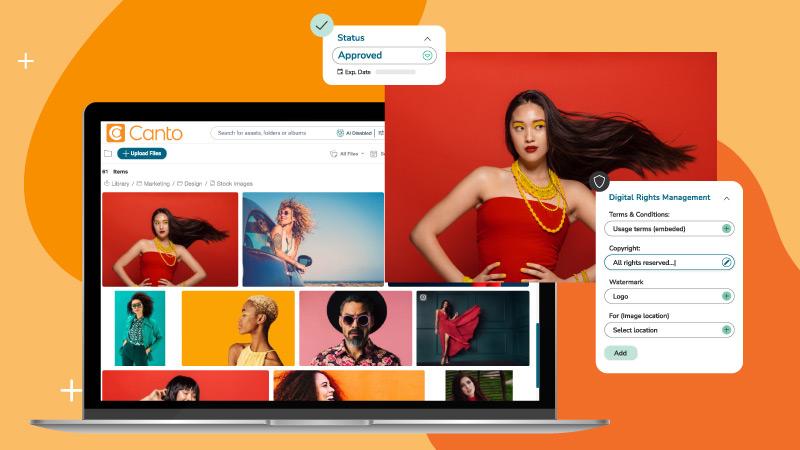
As easy as it looks, there are plenty of reasons why editing metadata manually isn’t ideal. Users in need of many edits will prefer a dedicated metadata editor or digital asset management software that can handle bulk changes efficiently and reduce the risk of errors.
If you choose to use software, make sure it is suitable for the types of image files you will want to work with and can deal with the extensive editing tasks required.
Sometimes users need to edit metadata because of missing fields or unsatisfied parameters. For example, the data doesn’t include things like a title (which may be known only to the user), so choosing a top metadata editor that streamlines bulk updates can be helpful.
Others may need to remove metadata from photos to hide sensitive details before uploading them to social media.
Whatever the reason, when you need to switch up, remove, or add a few key data details, follow a consistent process and keep a backup of the original files until changes are finalized. Also, it doesn’t hurt to keep a backup of the original files until you are happy with the results of your metadata changes.
Manage your digital assets and photo metadata at scale with a DAM platform that delivers the benefits of digital asset management.
A digital asset management platform stores, organizes, searches, manages, and distributes your brand’s digital assets, especially when it works alongside a content management system (CMS) as part of a broader content strategy.
It’s a smart way to address the content chaos caused by today’s demands for image and digital content production. DAM software also helps you manage, search for, and edit metadata for stored files, with thumbnail previews for easy content visibility and robust DAM metadata tagging capabilities.
Frequently asked questions about photo metadata
What is the easiest way to get metadata from a photo?
The easiest way to get metadata from a photo is by using built-in features on your device, such as right-clicking the image file and selecting “Properties” on Windows or “Get Info” on macOS. Alternatively, you can upload the photo to a free online EXIF data viewer to quickly access detailed metadata without installing any software.
Is EXIF data guaranteed to be accurate?
No, EXIF data is not guaranteed to be accurate. Metadata can be edited, removed, or altered using specialized software, so it’s important to keep in mind that the information may not always reflect the photo’s original details.
Can I remove metadata from my photos?
Yes, you can remove metadata from your photos using various tools and software. Removing metadata helps protect your privacy by eliminating sensitive information, such as GPS location, before sharing images online. Many online EXIF viewers also offer options to download images with metadata removed.
Do all photos contain metadata?
Not all photos contain metadata. Some devices or camera models may not record metadata, and certain image formats, such as GIFs, do not support EXIF data. Additionally, metadata can be stripped during editing or file conversion.
How can I prevent my photos from storing location information?
You can prevent your photos from storing location information by turning off geotagging or location services in your camera or smartphone settings. This stops GPS data from being embedded in the photo’s metadata.
What is the difference between EXIF, IPTC, and XMP metadata?
These three formats are the most commonly encountered in digital photography and publishing. While they often coexist in the same image file, each covers a different dimension of information.
| Format | Primary purpose | Typical fields | Who uses it most |
|---|---|---|---|
| EXIF | Records technical capture data automatically when a photo is taken. | Shutter speed, aperture, ISO, focal length, GPS coordinates, date/time, camera make and model | Photographers, forensic investigators, and anyone verifying when and where an image was taken |
| IPTC | Provides editorial and rights information for cataloging and media exchange. | Caption, credit line, copyright notice, creator name, contact details, embargo information | Journalists, editorial teams, photo agencies, stock libraries |
| XMP | Offers a flexible framework for embedding both standardized and custom metadata, including rights management. | Licensing terms, usage rights, revision history, and custom fields defined by software (e.g., Adobe Lightroom adjustments) | Designers, DAM administrators, and marketing teams managing large asset libraries |
Can I view metadata on my phone?
Yes, most smartphones let you view basic metadata directly in the photo gallery or the image info section. For more detailed metadata, you can use dedicated photo metadata viewer apps available for download.
What tools are best for managing large collections of photos and their metadata?
For managing large collections, Digital Asset Management (DAM) platforms provide centralized control over image libraries and metadata workflows, and modern cloud-based DAM software makes this accessible from anywhere. When evaluating options, a practical guide to choosing the right DAM system can help you prioritize features. Tools like Canto or Fotoware streamline metadata editing, searching, and organization at scale when you follow digital asset management best practices.
Is it safe to upload photos to online metadata viewers?
Reputable online metadata viewers respect your privacy and do not save or share your uploaded images. However, it’s always wise to review the privacy policies of any online tool before uploading sensitive or private photos.